Categories optimisation is the foundation of eCommerce SEO ranking and overall user experience. If your categories are not optimised well then you you will struggle to rank.
eCommerce category optimisation involves assessing core selling segments, navigation planning, creating an amazing category user experience, and building content to gain authority to support rankings of monetised pages.
The primary objective of your e-commerce store is to drive traffic, boost conversions, and revenue growth and you can not achieve this with proper e-commerce category optimisation.
Think of your e-commerce as a ‘digital supermarket.’ A poorly structured site doesn’t just frustrate users; it also confuses search engines, costing you traffic and sales.
If you are serious about boosting eCommerce sales then you must optimise your categories.
Let’s explore how to optimise eCommerce categories in a step-by-step manner to ensure users can find what they are looking for, and structure well so that search engines can crawl & index for ranking.
Table of contents:
- Create a good eCommerce structure
- Add Main Keywords in the URL, H1, Meta Title & Body Text
- Add category description
- Build topical authority/map to support categories
- Add contextual internal links
- Avoid creating duplicate or similar category pages
- Add schema/structured data
- Optimise category page size & speed
Create a good eCommerce structure
Creating a good eCommerce structure is essential for easy access, crawling & indexing, ranking, easy management, and adding future enhancements.
Here are some key steps to help you build an effective eCommerce site structure:
Define a Clear Hierarchy
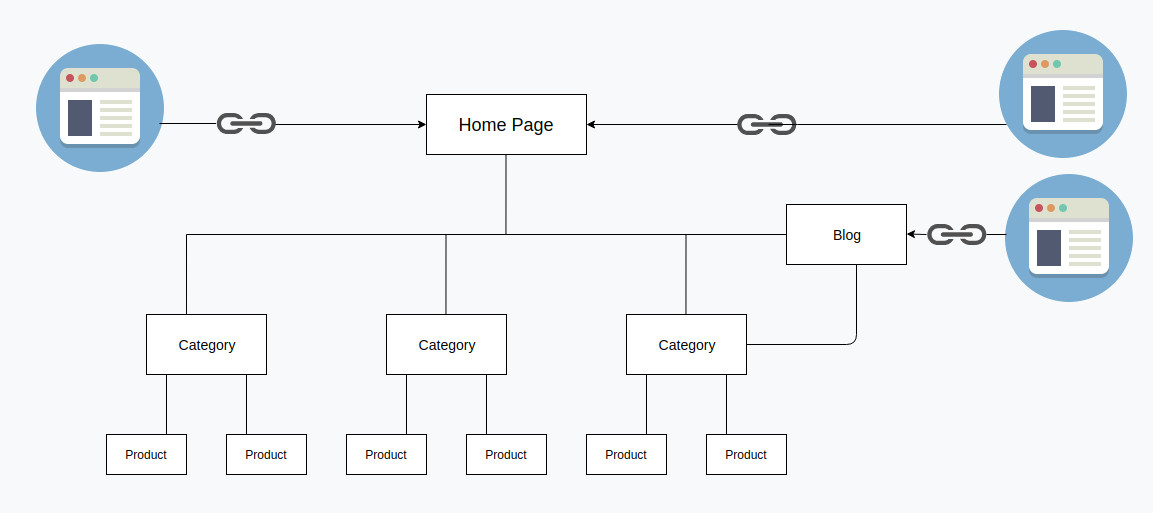
Your website should be easy to navigate for a seamless shopping experience. Start with a homepage that shows a broad category of your product offerings.
Group those categories into specific subcategories, to eventually have a dedicated page for each product.
Avoid Multi-Level Navigation

Image source: codyhouse.co
Keep your navigation to a minimum level. Multi-level navigation can confuse users.
Make your categories not more than 2 clicks deep
Ensuring that your categories are easily accessible is a crucial aspect of optimising your eCommerce website. The principle of keeping categories within two clicks is rooted in enhancing user experience and minimising bounce rates.
Structure For Ranking Authority Flow
Contextual links are critical for SEO. Poorely structure websites often struggle to take advantage of proper authority flow though internal linking.

Create navigation, and content pages/blog categories based on the specific theme/segment of the website.
Leverage Bradcrums
It helps users and search engines to navigate through the pages.
Avoid Orphan Pages
Orphan pages are not SEO’s friend. Create the website structure so that each pages are connected.
Create User-Friendly URLs
Don’t just create a random URL structure, they should complement your website hierarchy.
Example of good URL structure
- example.com/mens-shirts
- example.com/casual-shirts
- example.com/navy-full-sleeve-mens-shirt
Create Sitemap To Boost Indexing
Make sure you have both XML and HTML sitemap and if have tonnes of pages then create a hierarchical sitemap for search engines to navigate through different pages for crawling and indexing.
Implement Pagination Correctly
When you have a large number of products, you need to have pagination and implementing it correctly is key.
Add Main Keywords in the URL, H1, Meta Title & Body Text
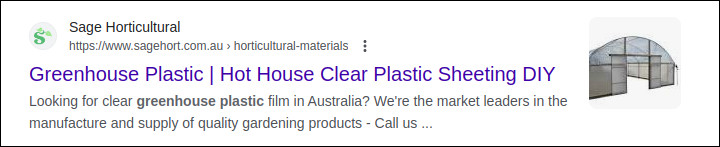
To improve the ranking of your eCommerce category pages, it’s crucial to strategically place your target keywords in key on-page elements. These include the category URL, H1 (main heading), meta title, and category description.
Why is this important?
How you frame your meta title has a direct impact on the click-through rate. Make sure to utilise the maximum length to gain prominence. You can use the meta title length checker, to try a different combination to come up with the best title possible.
Search engines use these words in the meta tag to understand the page’s relevance to a search query. A well-optimised URL, H1, and meta title signal strong category relevance, while a detailed category description enhances keyword context.
Best Practices:
- URL: Keep it short, clean, and keyword-rich (e.g., example.com/mens-running-shoes/ instead of example.com/category123/).
- H1: Ensure the main heading includes the primary keyword naturally.
- Meta Title: Make it compelling and keyword-focused while maintaining readability.
- Body Text: Write an informative and engaging category description that incorporates variations of your target keyword naturally.
These fundamental optimisations lay the groundwork for higher rankings. To further boost visibility, enhance your page with internal links, structured data, and high-quality content.
Add category description
One of the most common mistakes that we see is not adding relevant category descriptions either on top or bottom to provide more relevance and depth for better ranking.
A well-crafted category description enhances relevance, provides context, and improves search engine rankings by helping Google understand the category’s purpose. It also enhances user experience by offering helpful insights about the products listed under that category.
Key Considerations for Writing a Strong Category Description:
- Use Keywords in Different Subheadings: Structure your description with Heading 2(H2s) and Heading 3(H3s) containing relevant keywords to improve readability and SEO.
- Write a High-Quality, Engaging Description: Your content should address both user intent and search engine requirements while maintaining a natural and informative tone.
- Bold & Highlight Key Information: It is worth bolding key phrases that answer specific search queries.
- Add Internal Links: Link to relevant products, subcategories, or related content pages for better cross-linking which helps in ranking.
- Avoid Duplicate Content: Ensure each category description is unique, avoiding generic or copied content across multiple categories.
- Optimise for Readability: Use bullet points, short paragraphs, and clear formatting to enhance user experience and engagement.
- Add Media: Add relevant media, don’t just write text descriptions. Images and videos help to make the page content look better and also help with SEO.
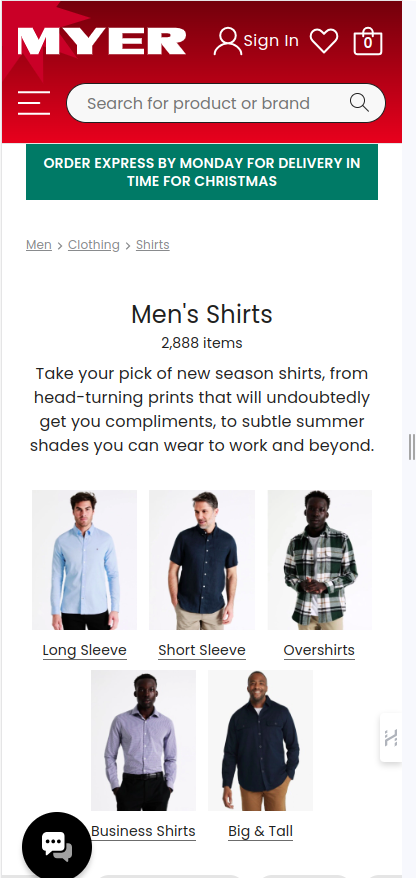
Adding a detailed and well-optimised category description not only improves eCommerce category rankings but also helps potential customers make informed decisions, increasing conversions and reducing bounce rates.
Build topical authority/map to support categories
One of the best ways to optimise and rank eCommerce categories is by building topical authority around the topic. This involves creating a network of high-quality, relevant content such as blogs, how-to guides, and case studies that support the category’s main theme.
By creating and implementing a topical map, you create a structured content hierarchy that signals to search engines that your website is an authoritative source on the subject. This approach improves relevance, strengthens internal linking, and enhances category page rankings.
How to Build Topical Authority for eCommerce Categories:
- Create Topical Map: Organise your content into clusters that align with each category. This means having supporting content such as blog posts, buyer guides, product comparisons, and tutorials all linking back to the category page.
- Create Informative & Valuable Content: Focus on user intent by providing solutions, answering common queries, and offering expert insights related to your category including case studies.
- Use Internal Linking to Strengthen Connections: Strategically link from relevant supporting content (blogs, guides, case studies) to the main category page, passing SEO authority and relevance.
- Acquire Natural Backlinks: Building highly authoritative content is one of the best ways to acquire natural links which impacts significantly SEO ranking.
Building a topical map is a time-consuming process but if done well then you can expect a positive ranking state over time.
Add contextual internal links
You may have the best website structure if you fail to optimise on adding relevant internal links then you will struggle to rank eCommerce categories.
Best Practices for Internal Linking in eCommerce Categories:
- Context Is Key: However, not all internal links are equal, random or excessive linking can dilute relevance and confuse search engines. Instead, focus on contextual internal linking, ensuring each link is naturally placed and enhances the user’s journey.
- Anchor Text: Go with exact match or partial match anchor text with your internal linking. Avoid an exact match where it may not make sense.
By implementing contextual internal linking, you help search engines understand the importance of your category pages, distribute page authority effectively, and improve rankings.
Avoid creating duplicate or similar category pages
It is common for people to create similar category or sub-categories that leads to keyword cannibalisation failing to achieve the desired ranking.
Avoid duplicate content issues, one of the best ways to build healthy indexing is by ensuring you have unique and authentic content on your website.
Even your own content duplicated across categories can hinder SEO performance if not tackled.
Best Practices to Prevent Duplicate or Similar Category Pages:
- Consolidate Similar Categories: If multiple categories serve similar purposes, consider merging them into a single, well-optimised category page to strengthen the authority and ranking potential.
- Use Unique Content for Each Category: Avoid copying descriptions across multiple pages, customise content based on product variations, user intent, and search demand.
- Implement Canonical Tags for Necessary Duplicates: If duplicating a category page is required for user experience, use canonical tags to indicate the main source to search engines, preventing duplicate content penalties.
- Monitor for Unintentional Duplicate Pages: Regularly audit your pages, URL structure, sitemap, and indexed pages in Google Search Console to identify and fix any unintentional duplication issues.
Add schema/structured data
Most e-commerce websites are built with a large number of web pages, each featuring different types of content. As a result, Google must allocate a significant portion of its crawl budget to understand the content and context of each page. There is a good chance that GoogleBot misses or misinterprets some of this information.
Structured data, also known as schema markup, is code embedded in a website’s HTML to help search engines better understand the page’s content and context. Structured data can be utilised to provide additional information such as product price, reviews, contact details, and social media profiles.
Benefits of Adding Structured Data for eCommerce
By implementing schema markup on your eCommerce category and product pages, you can:
- Enhance Search Appearance: Schema markup enables rich snippets (e.g., star ratings, prices, and availability) to appear in search results, making your listings more eye-catching and informative.
- Increase Click-Through Rates (CTR): Visually appealing results attract more clicks, increasing organic traffic to your store.
- Search Engines Can Understand Better: Since structured data provides explicit details, search engines can understand your pages better.
Types of Schema Markup for eCommerce Websites
To maximise SEO benefits, eCommerce sites should implement the following structured data types:
- Product Schema: Helps display product details, price, stock status, and reviews in search results.
- Review Schema: Showcases customer ratings and reviews for better credibility.
- Breadcrumb Schema: Improves site navigation by displaying a breadcrumb.
- FAQ Schema: If your category pages include FAQs, marking them up helps them appear in Google’s featured snippets.
It is important to follow schema.org guidelines to ensure you implement your structured snips with the best practices.
Optimise category page size & speed
Website page size and speed are critical factors in eCommerce SEO and user experience. Slow-loading category pages can lead to higher bounce rates, lower conversions, and poor search rankings. Since this is something within your control, optimising your category page size and speed should be a priority.
Optimise the code for faster execution
- Minimise HTML, CSS & JavaScript: Remove unnecessary or redundant code to make the page leaner.
- Enable Code Compression: Use code compression to reduce file sizes and boost execution time.
- Defer or Asynchronously Load JavaScript: Prevent unnecessary scripts from slowing down the initial page load.
- Reduce Unused CSS: When you use a standard CSS library, it may come with tonnes of standard codes and you may not use them all hence cleaning can boost the performance.
Optimise media files to reduce page size
- Compress Images: Optimise images for the web before uploading them on the website.
- Optimise Video Usage: If necessary, embed videos from platforms like YouTube or Vimeo instead of hosting them directly.
Test Page Speed & Take Action
- Speed Test: Use Google PageSpeed Insights or similar to measure performance and get actionable recommendations.
- Check Core Web Vitals: In Google Search Console focus on Largest Contentful Paint (LCP), First Input Delay (FID), and Cumulative Layout Shift (CLS).
- Optimise for Mobile: Ensure fast loading times across both desktop and mobile since mobile traffic dominates eCommerce.
Crawl stats & performance monitoring
- In Google Search Console >> Crawl Stats (under Settings):
- Ensure HTML content is 90% or higher under “By file type.”
- Check “By response” data to identify any slow-loading or error-prone pages.
By consistently monitoring and optimising your category page speed and size, you create a seamless shopping experience, improve search rankings, and increase conversions.
Do you need eCommerce SEO?
If you need professional eCommerce SEO services to optimise your categories, we can help. Our team at webapex has done this for many clients and we can optimise and elevate your eCommerce ranking too.
Check out our eCommerce case study page to learn more and see the outcome.

