Google shows an updated meta title or description within 1 to 7 days for regularly crawled websites. High-authority sites that publish constantly, such as news publishers, see changes within hours. Rarely crawled pages take 2-4 weeks.

Googlebot recrawls each page on its own schedule. No timeline is guaranteed.
Finalise Your Meta Tags Before You Publish
Every edit restarts the wait for Google to recrawl the page. Finalise the title and description first, then publish once.
Test both in the meta title and description length checker. It measures pixel width and character count, and scores your meta tag on four metrics: pixel width, keyword inclusion, separator and hook.
We ran regression tests on hundreds of meta titles to simulate how Google calculates pixel width.
Save versions to compare, and use AI suggestions to pick the strongest meta tag for your page.
Read the meta title and description length guide to learn how pixel width differs from character count and what happens when a title truncates.
What Affects How Fast Meta Tags Update
- Update Frequency: Googlebot recrawls websites that publish quality content more regularly.
- Website Authority: Established, well-linked sites are crawled more often than new or small ones.
- Internal Linking: Pages linked from prominent places like the homepage or main navigation are recrawled sooner than deep, isolated ones.
- Server Health: Slow server responses and crawl errors reduce how often Googlebot visits.
- XML Sitemap: An accurate lastmod date flags changed pages. Google uses lastmod only when it is consistently correct.
- Indexing Request: Request Indexing in Google Search Console queues the page for a priority recrawl.
How to Speed Up a Meta Tag Update
Follow the two methods mentioned below to improve your modified meta title and description recrawl.
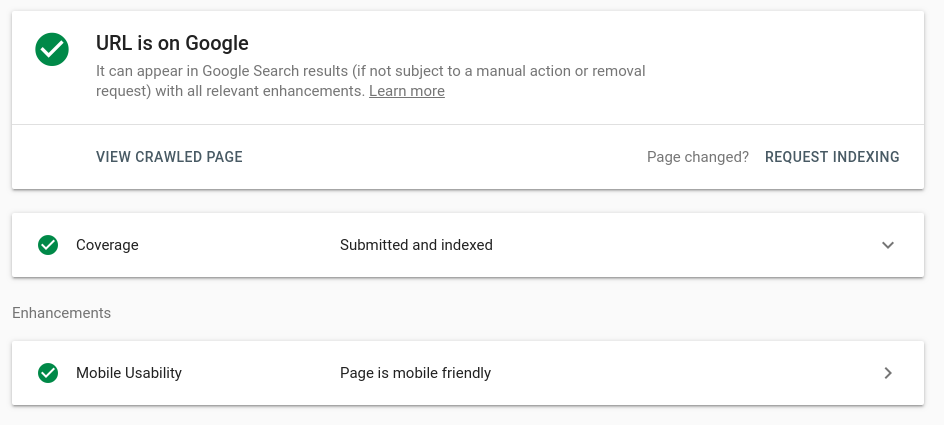
Step 1: Request Indexing in Google Search Console
- Publish the updated meta title and description.
- Paste the page URL into the URL Inspection tool in Google Search Console.
- Click Request Indexing.
Google queues the page for a priority recrawl. It does not guarantee a timeline, but meta changes often appear within hours.
Submit each URL once. Repeat requests do not speed up the crawl.
Step 2: Make Your Site Easier to Recrawl
Manual requests are a one-off fix and not suited for large websites. Natural crawling is a healthier approach. Googlebot recrawls trusted, frequently updated, well-linked sites more often, and those sites that are low in quality and change meta tags frequently.
Six signals drive recrawl rate:
- Quality Content: Crawling and indexing are driven by your overall content on the website. Maintain healthy content overall on your website; set the foundation right.
- Update Frequency: Improve your existing pages to ensure they are tailored to current search trends and regularly build new content; focus on quality vs quantity.
- Website Authority: Trusted sites are crawled more often. Build authority over time with original content and quality links.
- Architecture and Internal Linking: Keep important pages 1-2 clicks deep. Link important pages from the homepage and main navigation. Don’t leave any pages orphaned.
- XML Sitemap: Add an accurate lastmod date to every URL and update it only when the page content changes. Google uses lastmod only when it is consistently accurate.
- Last Updated Date: Show the last updated date on the page and match it in dateModified schema, so Google reads one consistent date.
- Server Health: Fix slow server responses and 5xx errors, because Googlebot slows its crawl when a server struggles.
FAQs
How long does it take Google to update a meta title and description?
1 to 7 days on regularly crawled websites and 2 to 4 weeks on occasionally crawled sites. Google shows the new version only after it recrawls the page, so the update is never instant.
Can Google rewrite my meta title or description after I update it?
Yes. Google rewrites a title that is too long, stuffed with keywords or a poor match for the query, often using the page's H1. It rewrites a description when a passage from the page answers the query better. Test your meta tag using meta tags length checker before you publish.
What affects how fast meta title and description changes appear?
Update frequency, website authority, internal linking, server health and an accurate XML sitemap lastmod date. A Request Indexing submission in Google Search Console adds a priority recrawl.
Can I force Google to update my meta title and description faster?
No. Request Indexing in Google Search Console queues the page for a priority recrawl, but Google decides when it happens.
Does a sitemap help Google pick up metadata changes faster?
Yes, when the lastmod date is accurate. Google uses a sitemap's lastmod value only if it is correct, so change it only when the page content changes.
How do I check if Google has updated my meta title?
Search site:yourdomain.com/page-url or "yourdomain.com/page-url" in Google has updated your title.
What should I do if my meta title still hasn’t updated after 2 weeks?
Check four things: the page is indexable (no noindex tag, no robots.txt block, a 200 status), the new title is live in the page source, Request Indexing has been submitted in Google Search Console, and the site has no crawl errors.

